
Here is a list of a few of my favorite free web sites and resources that I draw from when doing my lesson planning. I provide my reasoning for why I use them, as well as how I implement them in the classroom. This page is organized by Depth of Knowledge, because sometimes you just need a worksheet, and other times you need something more rigorous.
DOK Level 1
Hands down the best resource I have found when it comes to DOK 1 practice of specific math skills. My main use of this resource is for my weekly independent homework practice, which I create and assign on Monday morning, and is due by the students by Friday. All skills are listed by grade level and standard, which makes it simple to create a cumulative review assignment. When creating homework, I only include skills that students have had at least a few weeks to practice in class, or pre-requisite skills they might need to refresh in order to master current concepts being taught. For instance, if we are learning how to graph linear functions in 8th grade I will put coordinate plane graphing on the homework the week before.
My favorite aspect of DeltaMath is that you can assign either individual problems that you find relevant, or you can assign a single skill, such as solving two-step equations, and set it so that students must get a certain number of problem correct in a row before moving on. DeltaMath tracks everything the students do, including number of attempts, active time worked on the assignment, and percentage correct. When I review the report for each assignment at the end of the week, I can see who completed the assignment, how much time it took them, and which students might need some intervention during tutorial the next week based on their accuracy. As a weekly assignment, students have agency over when to complete the work depending on their schedule for the week.
An added bonus is that DeltaMath includes instructional videos for every single topic (this does require a paid PLUS account to access), so if they get stuck on a topic, they can watch the video before moving on. This can also be used as a flipped teaching resource if there is a small skill or concept you want the students to learn before coming to class. There are other features of the site, like guided practice, exploration activities, and assessments, that I do not use as much. Overall, this is an amazing resource for that DOK level 1 practice that you can structure in many different ways. Love it!
DOK Level 2 & 3
Open Middle really raises the rigor in the classroom. While a DOK 1 problem has students”Do”, Open Middle DOK 2 (and sometimes DOK 3) problems have the students “Create”. Here’s the difference, and why using them is so important.
Normal DOK 1: Solve the equation 2x + 3 = -8
Open Middle DOK 2 question:
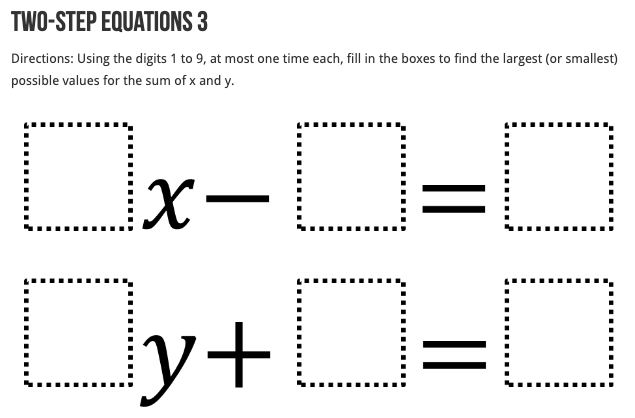
Most problems have a series of empty boxes within a math problem, and some kind of constraint on what kinds of numbers can be placed inside the boxes. There is some kind of goal, such as to create the largest or smallest possible answer, or an answer closest to a certain numerical target. Students are required to think strategically about where to place the numbers, which quickly reveals their conceptual understanding of the topic. Students who are able to think strategically, and also explain their reasoning, show strong mastery of a topic.
These activities can be used in a variety of ways. Sometimes I use one at the beginning of a unit to get a sense of what the students already know about a topic. If teaching solving equations with variables on both sides in 8th grade, I might give the above example to them as an intro activity to quickly see how students are reasoning about equations from 7th grade. Add in a section where they must explain why they did what they did and you have a pretty effective formative assessment before delving into the new material. I also use them in the middle of a unit to increase the rigor on a concept. Every once in a while I use one as an assessment, to see what level mastery the students are at on a given Target.
If you are not using Open Middle problems in your math class, please start now.
3-Act Tasks
3-Act tasks have been around for a while. I first discovered them at a district math professional development and have been using them ever since. Developed by Dan Meyer (if you teach middle school math, you probably know who this is), the 3-Act task is an amazing question producer in the classroom. Typically, students are presented with a short video or a picture that is meant to spark a mathematical conversation. Here is an “Act One” picture I have used in the past:
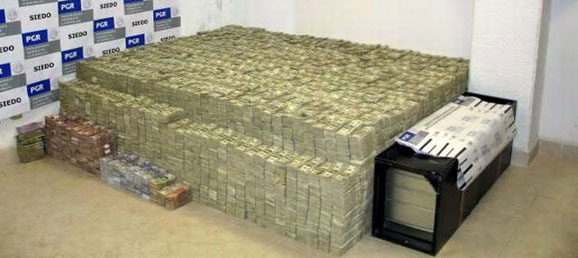
Just imagine what kinds of questions students ask when looking at this picture!
The goal is to have the students investigate some kind of mathematical concept. I have used the above picture in a unit involving volume, for instance.
The main flow of a 3-Act lesson goes something like this:
Act 1: Present an interesting video or picture to the class and have the students ask math related questions based on what they notice and wonder. The class then decides on at least one of the questions to try and answer.
Act 2: Students make reasonable estimates as to what they think the answer might be. Students then discuss in teams what they already know about the problem, and also what information they still need to know in order to solve it. At this point you can either give them some of the selected information (assuming you know it), or have students research it on their own. Teams work on solving the problem.
Act 3: The solution is revealed (usually to cheers or groans), then the students write down an explanation of how they tried to solve the problem, whether they were correct or not, and what might have caused them to be incorrect.
I think my favorite thing about these lessons is that the answer is almost always messy. Students need to realize and grapple with the fact that math doesn’t always have a perfect answer, and when dealing with imprecise numbers, close estimates are valuable. I have never had a student figure out the exact amount of money in the room shown above, nor do I really expect them to! But if they can work together and use their skills to get something reasonably close, I’m excited.
Here is where I have found the best 3-Act tasks that I have used in my classroom:
- Dan Meyer’s 3-Act Task Bank on Google Drive
- Robert Kaplinsky’s Real World Problems
- Tap Into Teen Minds by Kyle Pearce
- Mr. Orr Is A Geek
Visual patterns is a web site created by Fawn Nguyen. It contains hundreds of patterns, such as the one shown below:

These patterns can be used to get an insight about how students are thinking about linear, exponential, and quadratic patterns, among others. You can give the entire class the same pattern and ask them to explain and show how the pattern is growing and easily get four or more different explanations that are all valid. How would you explain the pattern shown above?
Students can then turn the patterns into mathematical expressions or equations and figure out how many penguins would be in the 4th step, 10th step, or nth step.
My favorite thing about visual patterns is learning the different ways my students see them growing, and how they share that with the class. I’ve had so many occasions where a student explains how they see the pattern and half the class goes, “woah, that’s so cool”.
My go-to “we need a break” activity, Which One Doesn’t Belong gets kids thinking, talking, and moving. The basic premise is simple. Display an image with four options and have the students pick which one does not belong with the other three. Here is an example:
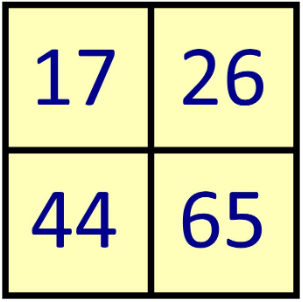
The beauty is that every number can be chosen and justified with precision, sometimes in multiple ways.
I use this activity when I know the students need a break, but I still want them using their brains. I have a few of these always at the ready and display the picture on the overhead screen. I give them one minute to think about which one to pick and why, then have them stand in the corner of the room assigned to that number. They sort themselves, then partner up and explain why they picked what they did. I then select one random student per corner to explain their reasoning, using the sentence frame, ” _____ does not belong because _______”. This is a great time to teach the math practice of “attending to precision”. I push back on imprecise vocabulary, and have students do rebuttals if reasons are not clear or not correct. Sometimes we have a math fight. It’s great.
Every once in a while I have the students sort themselves into their chosen corners, then make them move to a different corner, which changes what they were going to say. It’s my attempt to challenge their thinking and get them to be more flexible in their thinking. My favorite thing is when only one student ends up in a corner and is able to clearly justify why that number doesn’t belong. True independent thinking!
Desmos
Between the free graphing calculator, amazing lessons, and geometry tools, there isn’t much you can’t do on Desmos. I would be surprised if you were a math teacher and DIDN’T use this resource on a weekly, if not daily basis. I have only just now started getting into designing my own lessons on Desmos, as coding has never been something I have learned how to do. The computational layer is very intimidating for me, but so many other teachers have created such amazing lessons on Desmos for free that I wonder if I should even learn. I wish I had access to this tool when I was learning math in school. The graphing calculator alone is a game changer.
Plickers is a formative assessment tool you can use for free in your classroom to gather whole class real time data on how your students are understanding your lesson. Each student gets a QR code printed on card stock, and you present a question on a slide deck through the Plickers website. Students answer the question based on how the students hold the card. You scan the room with your phone through the Plickers app and the results are instantly tallied. It’s magic, and I love it. I wrote more about how I use this tool here.
So ends my list of my main go-to resources (so far). If you have others that you find are reliable and worth exploring, please comment below.
 EZMath Blog